Look out for the people you love, without looking over their shoulder
Invite family with a PillPip ID or QR code. Caregivers see dose status, manage medicines and get a siren alert when a dose goes unanswered. Nothing is shared by default.
- Invite by PillPip ID, code or QR
- Owner, admin, caregiver and member roles
- Nothing shared by default
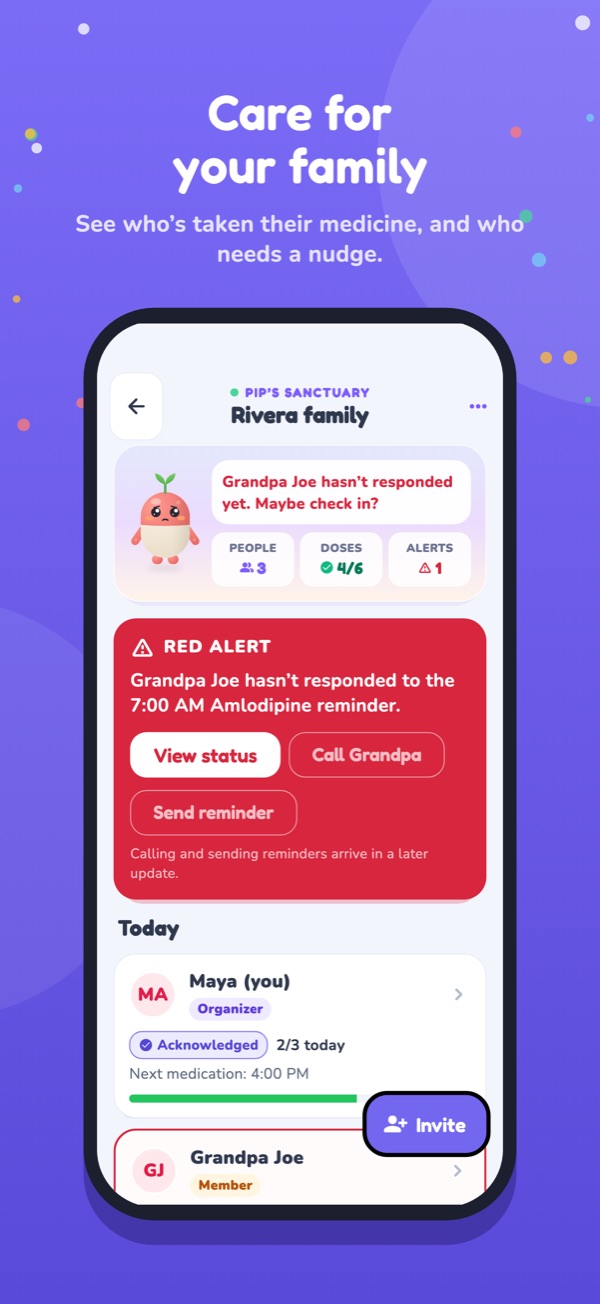
- Family dashboard of today's doses
- NO RESPONSE after 15 minutes
- Missed-dose siren for caregivers
- Caregivers can manage medicines
Your mum lives two hours away. Every evening you call to ask, "Did you take your tablets?" She says yes. You both know you're not sure.
With PillPip, she gets the reminders and you get the peace of mind. You see today's doses at a glance. If a dose goes unanswered, your phone rings a siren. And she decides exactly what you can see.
Invite in seconds
- By PillPip ID
- Type their PillPip ID (like MED-8F29K6). The invite appears in their Family tab, and you can give them a private name.
- By code or QR
- A single-use code (ABCD-EFGH-…) that expires after 48 hours. Copy it, share it, or revoke it.
- Choose the role
- Each invite says whether they join as a caregiver or a family member.
- Easy to join
- Scan the QR code with the camera, or type or paste the code.
Consent first, always
Before joining, a consent screen shows who invited you, your role and what you'll share. Nothing is shared before you accept, and you can decline.
Each person chooses, per family, what to share. Nothing is shared by default:
- My dose status
- Whether each dose was taken, skipped or missed.
- Medicine names and doses
- Only together with status. Otherwise family sees "Medication".
- Let the owner manage my medicines
- Lets the family owner add and edit medicines for you.
Roles and caregiver permissions
Families have an owner, admins, caregivers and members. The owner can make someone admin or take it away, and can hand ownership to someone else. Owners and admins set each caregiver's permissions, never beyond what the member allows:
| Caregiver permission | What it allows |
|---|---|
| See dose status | Today's doses on the family dashboard |
| See medicine names | Names and doses instead of "Medication" |
| Manage medicines | Add or edit the member's medicines |
| Get no-response alerts | Skipped and missed-dose push alerts |
The family dashboard
See each visible member's doses today: Upcoming, Due now, Acknowledged, Skipped, Snoozed or Bypassed. If a member hasn't responded 15 minutes after a dose, it shows NO RESPONSE on a red alert card.
Alerts that reach you
- Skipped alert
- Sent when a member reports skipping a dose.
- Missed alert, with a siren
- Sent when a member answers none of their reminders. It rings a siren on the caregiver's phone through an alarm-category channel.
- Who gets them
- The family owner by default, or whoever has "Get no-response alerts". Only members who share their status are covered, and anyone who turns off family notifications gets nothing.
- Private message text
- The alert names the medicine only if you may see names. Otherwise it says "a medicine".
- Reliable, not noisy
- Alerts are checked every 2 minutes. Each dose alerts each person at most once, and anything older than 24 hours is ignored.
Manage a parent's medicines remotely
With permission, a caregiver can add or edit another member's medicines. Changes appear on the member's phone, and each one is logged in the family's Activity & consent history. That log never records medication details.
Everyday family tools
A "How family care works" explainer in the app covers all of this.
- Private nicknames
- Call someone "Mum" in your app. The nickname stays on your phone only.
- Leave or remove
- Leave a family any time. Owners and admins can remove someone.
- Rename or delete a family
- Deleting asks you to type the family name to confirm.
- Clear notices
- "You were removed" or "Family deleted" notices you can dismiss.
Free. No sign-up. No ads.
PillPip: Medication Reminder is coming soon to iPhone, iPad and Android.
Family & caregiver alerts: questions
Can I get an alert if my parent misses their medicine?
Yes. If a family member who shares their dose status doesn't answer any of their reminders, the owner (or a caregiver with "Get no-response alerts") gets a missed-dose push alert that rings a siren.
Can family see my medicine names?
Only if you turn on "Medicine names and doses" for that family. Otherwise they see "Medication", and alerts say "a medicine".
Can I add medicines to my mum's phone?
Yes, if she turns on "Let the owner manage my medicines" and you have the Manage medicines permission. Changes appear on her phone and each one is logged.
How long does a family invite code last?
48 hours. Each code is single-use, and you can revoke it any time.
More PillPip features
Pill reminders & loud alarm
A heads-up, follow-ups, then a loud alarm that rings even on silent. Reminders stop the moment you answer.
Dose tracker & history
Today's doses grouped by time, Taken / snooze / skip with a reason, full history and a CSV for your doctor.
Medicine cabinet & schedules
Dose, notes, pill shape and colour, a photo, and schedules from daily to every N days or as needed.
Focus Mode
An opt-in check-in that stays until you answer, and can pause your other apps. Calls always work.
Health tracker & symptom log
Mood, pain, weight, blood pressure, water, running and your own trackers, with a calendar and reminders.
Pip, streaks & rewards
Earn stars, level up, keep a streak and unlock 9 achievements that Pip wears with pride.
Lock screen, widgets & Live Activity
Pip's face for today on the lock screen and home screen, and a Live Activity countdown on iPhone.
Privacy & no sign-up
No account, email or password. A random PillPip ID, no ad SDKs and one-tap control of your data.
PillPip is a reminder and organizer. It records what you report, doesn't prove a medicine was taken, and isn't medical advice or an emergency service. Always follow your prescriber or pharmacist. Read the PillPip Terms of Use and Privacy Policy.