Focus Mode: your apps wait until your medicine is done
PillPip Focus Mode (opt-in) shows a check-in that won't go away and can pause your other apps until you respond. Calls and emergency always work. Auto-stops after 2 hours.
- Opt-in
- Check-in stays until you respond
- Pause all apps until you check in
- Emergency bypass
- Calls, Settings and home screen always work
- Stops covering apps after 2 hours
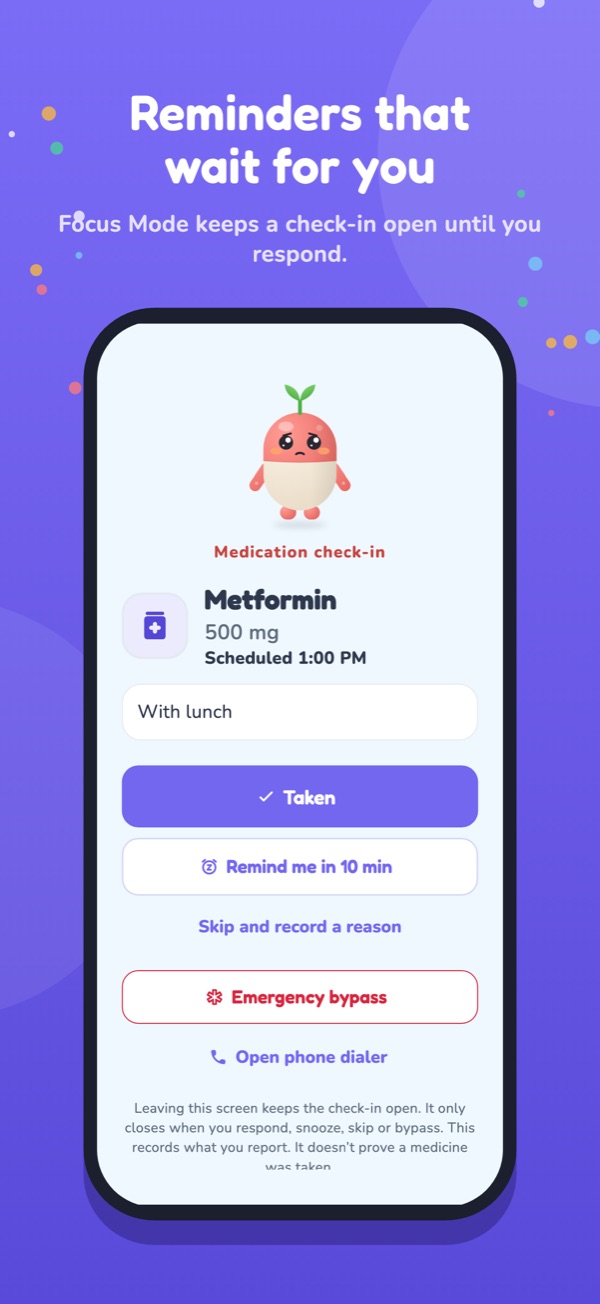
You heard the reminder. You meant to. Then you opened one app "for a second", and an hour went by.
Focus Mode is for that. Turn it on, and when a dose is due PillPip puts a check-in in front of you that doesn't go away when you swipe it. With "Pause all apps until you check in", your other apps wait too. It takes one tap to answer, and you're back.
A check-in you can't swipe away
At the due time, a check-in screen appears and stays until you respond: Taken, Remind me later, Skip with a reason, or Emergency bypass. Dismissing does nothing. Swiping away the notification or leaving the screen doesn't close it.
Pause all apps until you check in
When you turn Focus Mode on, this is on by default. You can switch it off and keep just the check-in.
- Android
- A "Medication check-in first" cover appears over other apps, with Open check-in and Emergency call buttons. It works over the lock screen and comes back after a reboot or app update.
- iPhone and iPad
- Apps are shielded through Apple's Screen Time (Family Controls) with a PillPip shield screen, kept up to date by a background monitor.
Safe by design
- Always reachable
- Your home screen, phone and dialer, Settings, emergency and system apps are never paused.
- Emergency bypass
- One tap on the check-in gets you out when you need your phone now.
- Safety valve
- App covering stops on its own after 2 hours. The reminder stays.
Clear about permissions
Focus Mode needs a few system permissions. A checklist shows each one with its own Allow button: notifications, alarms, full-screen notifications, usage access, display over other apps and Screen Time. A "What Focus Mode can and can't do" explainer tells you exactly what to expect.
Free. No sign-up. No ads.
PillPip: Medication Reminder is coming soon to iPhone, iPad and Android.
Focus Mode: questions
Can I still make calls when Focus Mode is on?
Yes. The phone and dialer, emergency apps, Settings, system apps and your home screen are always reachable. The check-in also has an Emergency bypass.
Is Focus Mode on by default?
No. Focus Mode is opt-in. Once you turn it on, "Pause all apps until you check in" is on by default, and you can switch it off.
What if I can't respond for a long time?
PillPip stops covering your apps after 2 hours. The dose reminder stays so you can still answer it.
How does PillPip pause apps on iPhone?
Through Apple's Screen Time (Family Controls). You grant access in the permission checklist, and PillPip shows its own shield screen on paused apps.
More PillPip features
Pill reminders & loud alarm
A heads-up, follow-ups, then a loud alarm that rings even on silent. Reminders stop the moment you answer.
Dose tracker & history
Today's doses grouped by time, Taken / snooze / skip with a reason, full history and a CSV for your doctor.
Medicine cabinet & schedules
Dose, notes, pill shape and colour, a photo, and schedules from daily to every N days or as needed.
Family & caregiver alerts
Invite by ID or QR, see today's doses, manage a parent's medicines and get a siren when a dose goes unanswered.
Health tracker & symptom log
Mood, pain, weight, blood pressure, water, running and your own trackers, with a calendar and reminders.
Pip, streaks & rewards
Earn stars, level up, keep a streak and unlock 9 achievements that Pip wears with pride.
Lock screen, widgets & Live Activity
Pip's face for today on the lock screen and home screen, and a Live Activity countdown on iPhone.
Privacy & no sign-up
No account, email or password. A random PillPip ID, no ad SDKs and one-tap control of your data.
PillPip is a reminder and organizer. It records what you report, doesn't prove a medicine was taken, and isn't medical advice or an emergency service. Always follow your prescriber or pharmacist. Read the PillPip Terms of Use and Privacy Policy.