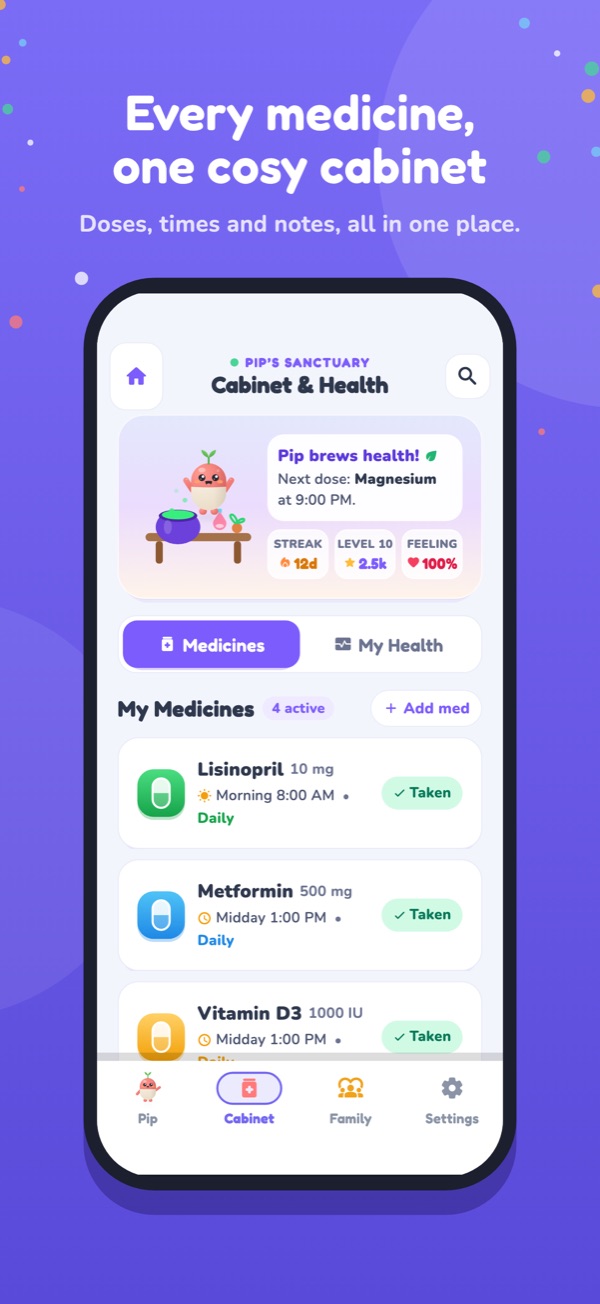
Every medicine, one cosy cabinet
Organize every pill in PillPip's medicine cabinet: dose, instructions, notes, pill shape, colour and photo. Daily, chosen days, every N days or as needed.
- Name, dose, instructions & notes
- 9 pill shapes, 9 colours
- Pill photo that stays on your phone
- Daily, some days, every N days, as needed
- Several times a day
- Pause per medicine
- Time zone and daylight-saving aware
The white round one is for blood pressure. Or is that the white oval one? When every tablet looks the same, a list of names isn't enough.
PillPip's cabinet holds every medicine, vitamin and supplement with the details that matter: the dose, "with food", the shape and colour of the pill, even a photo. And it handles real-life schedules, not just "once a day".
Everything about a medicine, in one place
- Name and dose
- The name is all you need. Add the dose, e.g. 500 mg.
- Instructions and notes
- "With food", "Not with milk", "Ask Dr Rao about this".
- Start and end dates
- Perfect for a 7-day antibiotic course. Add an end date and it stops on its own.
- A photo of the pill
- Snap the box or the tablet. The photo stays on your phone and is never uploaded.
Know your pills by sight
Pick a shape and colour so each medicine looks like the real thing on screen.
| Shapes | Colours |
|---|---|
| Round, capsule, oval, caplet | Purple, blue, red, green |
| Liquid, drops | Orange, pink, teal |
| Injection, inhaler, cream | Yellow, grey |
Schedules for real life
Each schedule keeps its time zone, and daylight-saving changes are handled, so travel doesn't scramble your doses.
- Daily
- Every day at the same times.
- Some days
- Only on the weekdays you choose, e.g. Monday, Wednesday, Friday.
- Every N days
- Every other day, every 3 days, and so on.
- As needed
- For pain relief or an inhaler. It's on your list, with no reminders.
- Several times a day
- Tap Add time for morning, noon and night.
A tidy list that sorts itself
Search your medicines, or let PillPip group them: Due now, Upcoming, Taken, Not today, Paused and As needed. Take a dose straight from the list, or open a medicine to see its schedule, dates, instructions, notes and time zone.
Pause reminders for one medicine and resume them later. Delete a medicine and it leaves your list, but its history is kept.
The apothecary
The cabinet lives in a painted apothecary with a bubbling cauldron. If you've turned on Reduce Motion, the bubbles stop.
Free. No sign-up. No ads.
PillPip: Medication Reminder is coming soon to iPhone, iPad and Android.
Medicine cabinet & schedules: questions
Can PillPip remind me every other day?
Yes. Choose "Every N days" and set N to 2. You can also pick specific weekdays, daily, or as needed with no reminders.
Is my pill photo uploaded?
No. The photo of your medicine stays on your phone and is never uploaded.
What happens to history when I delete a medicine?
The medicine leaves your list, but its dose history is kept.
Does PillPip handle time zones and daylight saving?
Yes. Each schedule keeps its own time zone, and daylight-saving changes are handled.
More PillPip features
Pill reminders & loud alarm
A heads-up, follow-ups, then a loud alarm that rings even on silent. Reminders stop the moment you answer.
Dose tracker & history
Today's doses grouped by time, Taken / snooze / skip with a reason, full history and a CSV for your doctor.
Focus Mode
An opt-in check-in that stays until you answer, and can pause your other apps. Calls always work.
Family & caregiver alerts
Invite by ID or QR, see today's doses, manage a parent's medicines and get a siren when a dose goes unanswered.
Health tracker & symptom log
Mood, pain, weight, blood pressure, water, running and your own trackers, with a calendar and reminders.
Pip, streaks & rewards
Earn stars, level up, keep a streak and unlock 9 achievements that Pip wears with pride.
Lock screen, widgets & Live Activity
Pip's face for today on the lock screen and home screen, and a Live Activity countdown on iPhone.
Privacy & no sign-up
No account, email or password. A random PillPip ID, no ad SDKs and one-tap control of your data.
PillPip is a reminder and organizer. It records what you report, doesn't prove a medicine was taken, and isn't medical advice or an emergency service. Always follow your prescriber or pharmacist. Read the PillPip Terms of Use and Privacy Policy.